
Yes. An AI assistant for business can remember team context when shared organizational memory connects the accounts, teams and systems behind its answers. Remembering a conversation is not enough: your evaluation should establish whether the assistant can use relevant company context after a handoff, recognize changed decisions and respect access boundaries.
- Computer connects accounts, teams and systems through native shared memory for an AI assistant for business.
- Evaluate an enterprise AI assistant on changed decisions and team handoffs, not just repeated questions.
- An AI teammate needs relevant company context; fluent answers alone do not prove useful memory.
- Use the confirmed 30-day Computer Pro free trial to evaluate real team tasks.
Can an AI assistant for business remember team context?
Yes, but remembering your last prompt and remembering your business are different requirements. A useful evaluation separates conversation history, information retrieval and shared organizational memory. These categories describe what to test, not a verified comparison of individual vendors.
| Context approach | Best for | Useful contribution | Limitation to test |
|---|---|---|---|
| Conversation history | Continuing a discussion | Keeps earlier messages available within that discussion | Does relevant context survive a new conversation or teammate handoff? |
| Information retrieval | Finding supporting material | Brings documents or records into an answer | Does the answer reconcile conflicting or outdated material? |
| Shared organizational memory | Work across teams | Connects company context across accounts, teams and systems | Does the assistant use current, relevant context within access boundaries? |
For your 2026 evaluation, start with a task that crosses a team boundary. Ask for an account briefing that depends on sales notes, an operational decision and a finance question. Assess the answer against the underlying records, not against how polished the summary sounds.
Computer, by DevRev, connects company accounts, teams and systems through native shared memory. Computer is best suited to business teams evaluating an AI teammate built around shared organizational context. Its fit for your team depends on how well it handles your actual work; the product description alone does not establish accuracy, coverage or permission behavior in your environment.
Why this matters: stop rebuilding the brief
A team does not work from one conversation. Sales discusses a commitment, operations changes the delivery plan, and finance asks whether the change affects a forecast. The next person needs the relationship between those facts, not another isolated summary.
Without a context test, you risk choosing an assistant because it writes a convincing response to a carefully prepared prompt. That demonstrates drafting under those conditions. It does not demonstrate that the assistant can carry the right business context into another task.
Make continuity a buying criterion in 2026. Your team should evaluate what the assistant remembers, what it retrieves, what it leaves out and how it handles information that no longer applies. A confident answer with an obsolete decision is still the wrong answer.
What should useful team memory contain?
Useful team context explains what a fact belongs to and why it matters. An account name is a starting point; the current decision, responsible team and supporting evidence make it actionable.
Use these categories to define the context your evaluation requires:
- Account context: The customer or business relationship involved in the task, including relevant commitments and open questions.
- Decision context: What the team agreed, what changed and which decision currently governs the work.
- Team context: Who owns the next step and which other teams depend on it.
- Source context: The records supporting the answer and any conflicts between them.
- Access context: Which information the requesting employee is authorized to use.
Do not treat this list as a promise that every assistant supports every category. Treat it as your acceptance checklist. Ask the vendor to demonstrate the categories your workflows require, then reproduce the result with your own permitted information.
A useful answer also distinguishes evidence from inference. If the source says a customer requested a change, the assistant should not silently turn that request into an approved commitment.
Why useful team context varies
The quality of a context-aware answer depends on the information and boundaries surrounding the task. These are evaluation factors, not claims about a particular product's implementation.
- Connected coverage: A cross-team question requires relevant information from the systems involved. Identify those systems before judging the answer.
- Changed decisions: An earlier agreement and a later correction create a stronger test than an unchanged record.
- Clear ownership: A briefing needs to distinguish the person who raised an issue from the person responsible for resolving it.
- Conflicting sources: Two records can disagree. Require the assistant to identify the disagreement rather than invent a resolution.
- Access boundaries: A useful answer must stay within the requesting employee's authorized scope. Verify that behavior explicitly.
- Task specificity: A vague request leaves your reviewers guessing what success means. State the decision the output must support.
For a 2026 shortlist, ask each vendor to work through the same scenario. Keep the task, permitted sources and review criteria consistent. Otherwise, you are comparing demonstrations rather than evaluating equivalent work.
Test memory with a real handoff
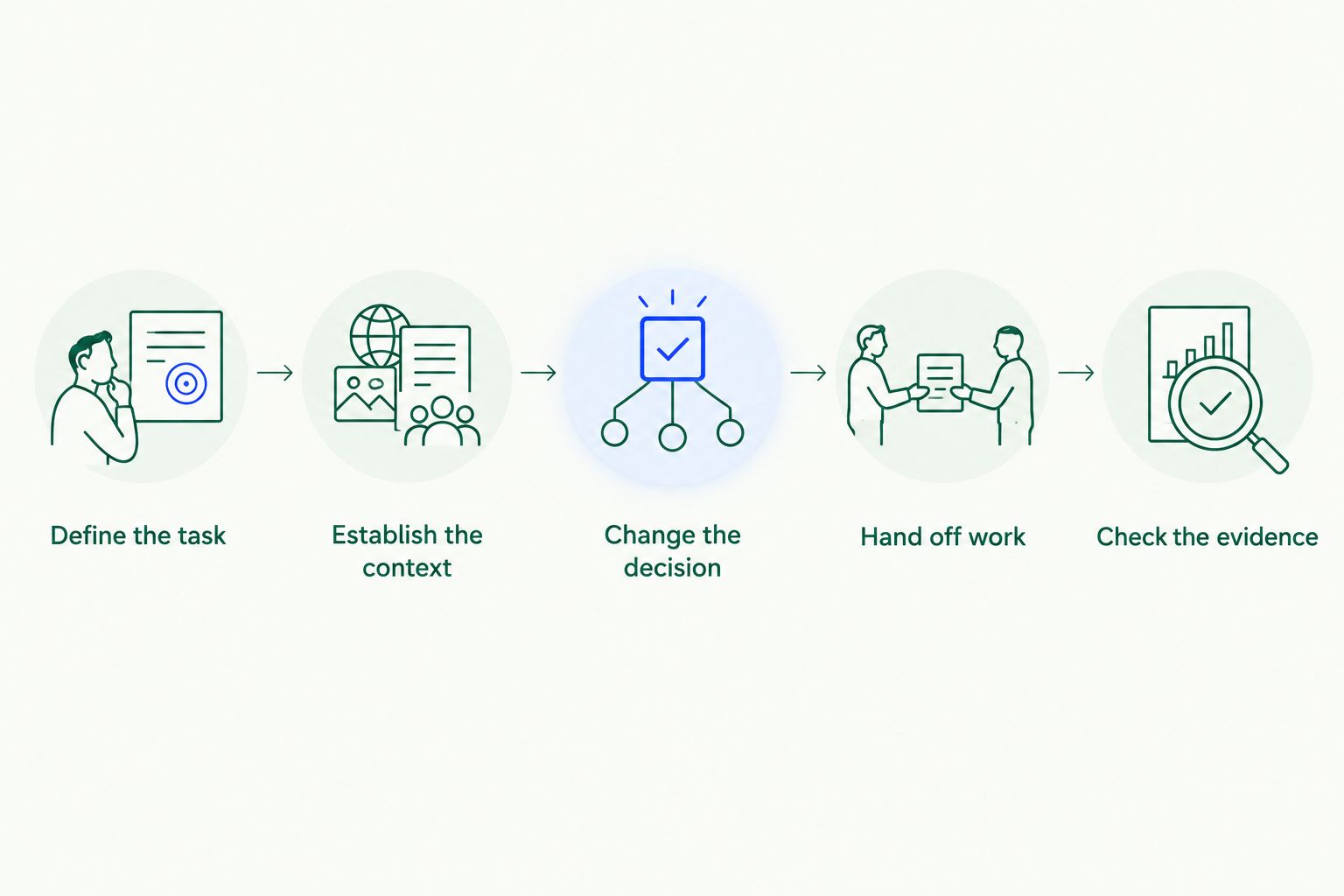
Start with 3 tasks across 2 departments, and include 1 changed decision. These are recommended evaluation conditions, not performance benchmarks. They create a manageable test that goes beyond repeating the same question.
Define the task
Choose work your team already understands. An account briefing, an operational update or a finance explanation works when a responsible employee can judge the result against known records.
Write down the intended user and the decision the output should support. Avoid a general request to summarize everything; it makes omissions difficult to assess.
Establish the context
Identify the permitted source material, current decision and responsible owner. Record the expected answer before testing so reviewers do not mistake persuasive wording for correctness.
Use information your team is authorized to include. Confirm the evaluation's data-handling requirements before connecting systems or supplying company records.
Change the decision
Introduce an authorized correction to the test material. For example, replace an earlier internal plan with a later approved plan, while retaining enough history to expose a contradiction.
Ask the assistant what changed and which decision now applies. It should not blend incompatible instructions into a compromise that nobody approved.
Hand off the work
Have a second authorized teammate request the next useful output in a fresh conversation. Do not paste the entire first exchange into the new prompt; doing so tests the supplied brief rather than continuity across the handoff.
If your candidate requires additional setup, document it. Setup effort is part of the buying decision, not something to hide from the evaluation.
Check the evidence
Compare the output with your expected answer. Mark incorrect claims, missing context, unsupported assumptions and any access concern separately.
A readable response can still fail. Require the right decision, supporting evidence and appropriate scope before calling the handoff successful.
What does this look like in everyday work?
The following scenarios are illustrative evaluation tasks, not measured customer results or confirmed product workflows. Use them to define what you need an assistant to do, then verify support during your assessment.
| Task | Company context needed | Requested output | How your team assesses it |
|---|---|---|---|
| Sales meeting preparation | Account discussions, open commitments and current internal decisions | A briefing with unresolved questions | Account owner checks accuracy and omitted commitments |
| Operations update | Project decisions, dependencies and responsible teams | A status explanation with next actions | Operations lead checks ownership and changed plans |
| Finance analysis | Approved definitions, relevant records and stated assumptions | An explanation separating evidence from assumptions | Finance reviewer checks definitions and supporting records |
| Daily briefing | Current priorities, decisions and open work | A concise brief of what requires attention | Team lead checks relevance and missed changes |
| Research and analysis | Research question, approved material and business constraints | A synthesis with evidence and unresolved questions | Subject expert checks support and contradictions |
| Brand and design drafting | Approved brief, terminology and stakeholder feedback | A draft that follows the current direction | Brand owner checks claims and decision consistency |
For an AI sales assistant, the evaluation should go beyond remembering an account name. Ask whether the output distinguishes a customer request from your team's approved response.
For an AI report generator, check whether the output preserves definitions and identifies missing support. A report that quietly changes what a metric means is not ready for distribution.
For AI for operations or finance teams, focus on ownership and evidence. The assistant's answer should help the responsible employee inspect the work, not replace an unresolved question with confident wording.
Does remembering context mean the answer is trustworthy?
Remembering context does not establish correctness. An assistant can use an outdated statement, misread a record or carry an unsupported assumption into a new output. Test each of those failure modes rather than accepting continuity as proof of trust.
Your 2026 review should distinguish three questions: Is the relevant information available? Did the assistant interpret it correctly? Is the requested output appropriate for this user and task?
Shared context offers a useful basis for cross-team work, but it also makes review boundaries important. Establish who approves customer-facing statements, financial interpretations and proposed operational changes. Do not infer approval or action controls from a general claim about memory.
Can another teammate use the same context?
Another teammate's ability to use shared context depends on the product's supported collaboration model, configuration and authorized access. Verify the behavior with separate users rather than asking the original user to repeat the task.
A good handoff test gives the second teammate enough instruction to request the work without supplying every answer. Ask for the latest approved position, the reason it changed and the next responsible owner. Then compare the response with the source material.
How should you use a free trial to decide?
Computer Pro offers a 30-day free trial. Use those 30 days to test a defined workflow across teams rather than collect disconnected examples of fluent writing.
Before starting, assign a task owner and a reviewer. Agree on the source material, expected answer, permitted scope and conditions that would stop the evaluation. Include a task where the correct response is to identify an unresolved question.
End your 2026 trial review with a written decision: adopt for the tested workflow, investigate specific gaps or decline. Keep the conclusion narrow. Success on meeting preparation does not establish readiness for every finance or operational task.
Test your team's context
Use Computer Pro's 30-day free trial to evaluate a real cross-team handoff.
FAQ
Can an AI assistant for business remember team context?
Yes, an AI assistant for business can use shared organizational context rather than rely only on one conversation. Verify continuity with a changed decision and a handoff between authorized teammates.
Is chat history the same as shared organizational memory?
No. Chat history preserves a conversation, while shared organizational memory concerns company context across accounts, teams and systems. Test whether relevant context remains useful outside the original exchange.
Does remembering information mean an assistant's answer is correct?
No. An assistant can remember an outdated statement or interpret information incorrectly. Review the supporting evidence and current decision before using the output.
What's a practical way to test an AI teammate?
Start with 3 tasks across 2 departments and include 1 changed decision. These are suggested evaluation conditions, not a benchmark or a claim about product performance.
Can shared memory help teams beyond sales?
Shared organizational context is relevant to operations, finance, research, drafting and daily briefings as well as sales. Verify each intended workflow separately rather than assuming success transfers between tasks.
How long is the Computer Pro free trial?
Computer Pro offers a 30-day free trial. Use that period to assess a defined team workflow, its supporting evidence and a handoff between authorized users.
One last thing
Ask what the assistant should stop treating as current. Remembering an old decision is easy to mistake for useful continuity. Recognizing that a later approved decision supersedes it is the more revealing test.
Keep the old and new records in your evaluation. The question is not whether the assistant repeats both; it is whether the output explains which one governs the work and why.