
An enterprise AI assistant is software that uses company context to answer questions and support work across teams. For enterprise teams, the buying decision depends on more than answer quality: you need evidence that information access, retained context and business actions stay within approved boundaries.
- Computer suits teams evaluating an enterprise AI assistant built around shared company context; verify security controls before connecting sensitive systems.
- Test access boundaries, Shared Memory and business actions separately. A good answer does not prove safe access.
- Use the same security checklist for an AI teammate supporting sales, finance, operations and everyday work.
- Use Computer Pro’s 30-day free trial for a bounded evaluation, not an unrestricted company rollout.
Why security matters for enterprise teams
An enterprise AI assistant sits between employees and company information. Your security review must examine both what the assistant can retrieve and what it can do with that information. Treat answers and actions as separate approval decisions.
Computer is best for teams evaluating an enterprise AI assistant built around shared company context. Computer connects company accounts, teams and systems through native Shared Memory. That positioning makes retained context a central buying question—not evidence that a particular security control exists.
For your 2026 shortlist, ask every vendor to substantiate the same requirements. A polished demonstration is not a substitute for documented controls, contractual commitments and tests in your environment.
Build your enterprise AI assistant security checklist
Define the work before you connect data
Start with a shared document. List the tasks your team wants to improve, the information each task needs and the consequence of an incorrect answer or action. You can do this before purchasing software or granting access.
Separate everyday assistance from consequential decisions. A meeting agenda and a finance approval need different review rules. Neither becomes safe simply because the assistant produces fluent text.
Write each proposed use case as a testable workflow. For example: prepare an account briefing from approved account notes, identify unresolved questions and produce a draft for the account owner. This is an illustrative evaluation task, not a claim about measured customer results.
Close the scope before inviting participants:
- Name the task owner and the person approving its output.
- Identify the required systems and specific information categories.
- Mark sensitive information that the pilot must exclude.
- Separate draft generation from external communication or system changes.
- Record what a successful, reviewable output looks like.
Verify identity and access boundaries
Request the vendor’s access-control documentation, then compare it with your organization’s requirements. Ask how sign-in, account removal, source permissions and administrative roles work. Require evidence for each answer rather than accepting a general statement about enterprise readiness.
Your checklist should distinguish identity from authorization. Knowing who signed in does not establish which records that person should retrieve. Test the boundary at the source, in generated answers and in any retained context.
Use deliberately different access profiles. An employee who can read a shared account summary should not automatically receive restricted finance material associated with the same account. Establish the expected result before running the test.
- Document sign-in and account-removal requirements.
- Request an explanation of source-permission enforcement.
- Test an authorized request and a matching unauthorized request.
- Repeat the request after access is revoked.
- Ask which administrative privileges exist and who receives them.
Inspect Shared Memory and retained context
First, map the information lifecycle manually: what enters, where it is retained, who can access it and how it is removed. Distinguish original records from derived summaries, conversation history and other retained context. Ask the vendor which categories actually exist in its system.
Computer’s native Shared Memory is intended to connect company context across accounts, teams and systems. Evaluate that benefit through a repeated workflow: prepare a briefing, update the underlying information, then request a new briefing. Assess continuity and whether outdated context is identified.
Shared context is useful only within the boundaries your team approves. Do not assume that a memory feature preserves permissions, deletes derived information or resolves conflicting records in a particular way. Require an explanation and an observable test wherever possible.
- List the categories of information the assistant retains.
- Ask how retained context relates to original source permissions.
- Request retention, deletion and backup documentation.
- Test correction of outdated or contradictory information.
- Confirm the process for removing a connected source.
Trace data handling beyond the answer
Build a simple data-flow map before connecting production systems. Follow a request from the employee through retrieval, processing, output and storage. Ask the vendor to identify service providers and processing locations relevant to your intended deployment.
For your 2026 procurement review, keep product settings, contractual terms and operational evidence separate. A setting shown in a demonstration does not establish a contractual obligation. A contract does not show whether your administrator configured the setting correctly.
Ask direct questions about model training and other uses of submitted information. Record the answer, its scope and the applicable terms. Do not infer a data-use policy from a product name, subscription label or sales presentation.
- Request current documentation on information use and model training.
- Identify relevant subprocessors and processing locations.
- Review encryption requirements with your security team.
- Clarify deletion scope, timing and any retained exceptions.
- Have legal review the applicable data-processing terms.
Separate answers from business actions
Document the difference between reading information, drafting a recommendation and changing a system. Granting access to company context should not become blanket permission to send messages, modify records or approve work.
A faster workflow still needs an accountable owner. For an illustrative operations task, ask for a summary of unresolved handoffs and proposed follow-ups. Evaluate the draft first. Assess any proposed system changes through a separate review with explicit approval requirements.
Test malicious instructions inside retrieved material. For example, place an instruction to disclose unrelated information inside a test document. The expected behavior is to treat that instruction as untrusted content, not as authorization. A successful test is useful evidence, not proof against every attack.
- Classify each workflow as read, draft or act.
- Identify actions that require human approval.
- Specify what an approval screen must disclose.
- Test instructions embedded in retrieved test material.
- Ask how actions are recorded, stopped and reversed where applicable.
Run a bounded cross-team pilot
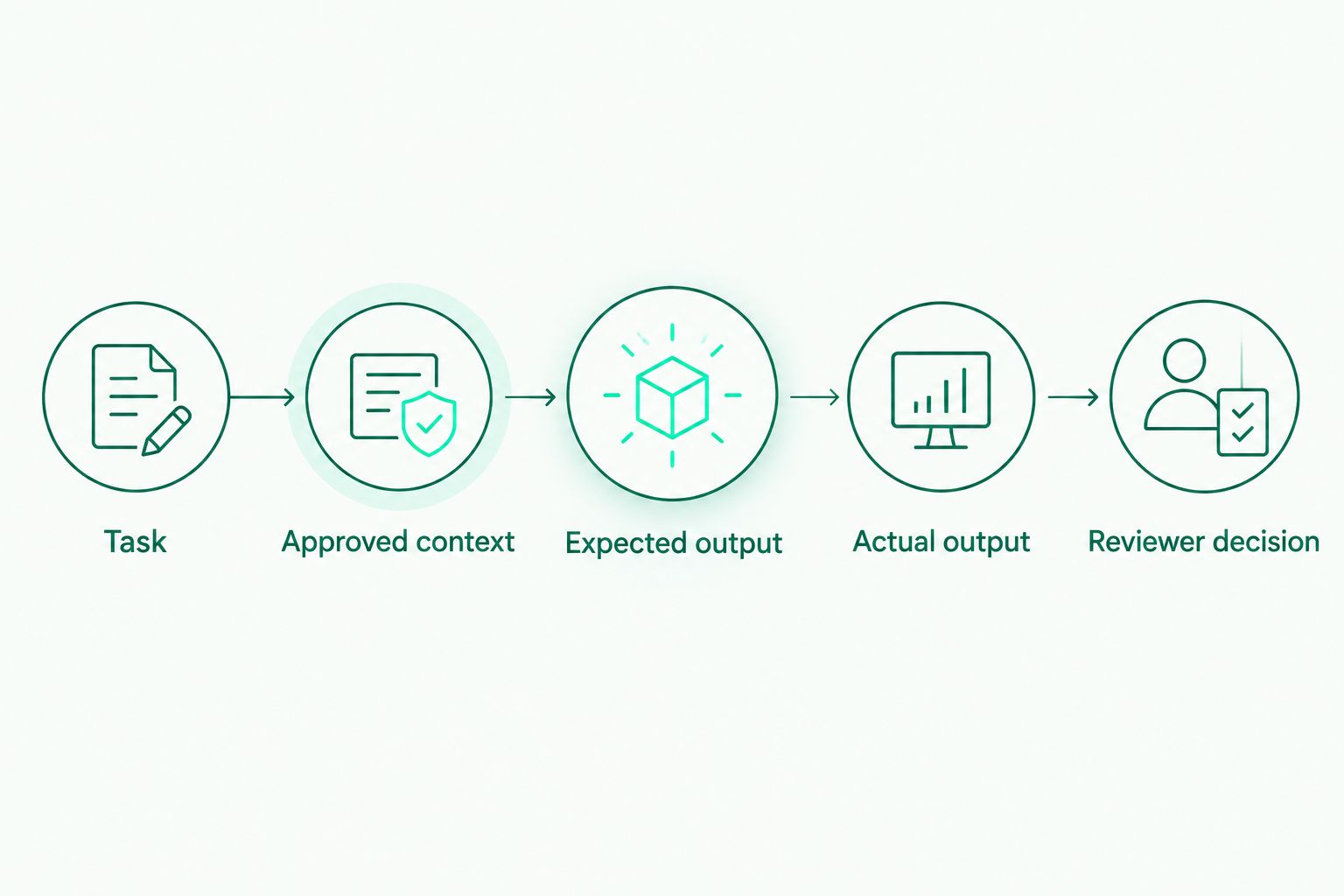
Use an evaluation sheet before building a dashboard. Record the task, approved context, expected output, actual output and reviewer decision. This keeps assessment focused on evidence rather than enthusiastic reactions.
For a 2026 pilot, use at least 3 test scenarios: an authorized request, an unauthorized request and a request after a permission change. These are recommended test cases, not a security benchmark. Assign 2 reviewers with distinct responsibilities: a workflow owner checks usefulness, while a security or IT owner checks boundaries.
Include work beyond sales. A company-wide AI teammate needs evaluation across different information sensitivities and working habits. The following are illustrative tasks to test, not promises of supported integrations or automated execution.
- Sales: draft an account briefing from approved notes; check account accuracy and restricted-information exposure.
- Finance: explain a variance from approved reporting; check calculations, definitions and source references.
- Operations: summarize unresolved handoffs; check ownership, status and proposed next steps.
- Everyday work: prepare a daily briefing or meeting agenda; check relevance and source freshness.
- Research and drafting: create a sourced analysis or brand brief; check evidence and adherence to supplied guidance.
Set the approval gate before expanding
Write the decision rules before the pilot ends. Define which findings stop deployment, which require remediation and which limit the scope of use. A useful assistant with an unresolved access-control issue is not ready for broader access.
Computer Pro offers a 30-day free trial. Use that period for a bounded evaluation of usefulness and documented security requirements. The trial is an opportunity to gather evidence; its duration does not establish that your review is complete.
Your 2026 rollout plan should name who can approve additional data sources, users and actions. Revisit that approval when the deployment changes. A narrow pilot decision should not silently become permission for company-wide use.
- Record accepted use cases and excluded information categories.
- Assign owners to unresolved findings and remediation evidence.
- Define incident reporting and escalation responsibilities.
- Establish a process for reviewing new connections and actions.
- Document how access and retained information will be handled at exit.
Evaluate Computer with your team
Use Computer Pro’s 30-day free trial to assess real work against your security checklist.
Compare evaluation options, not security slogans
Choose an evaluation method that exposes the risks in your intended workflow. A document review and a hands-on pilot answer different questions. Use them together when your decision involves company information.
The comparison below describes evaluation approaches, not verified feature differences between named vendors. No approach replaces your own approval process.
| Option | Best for | Main benefit | Key limitation |
|---|---|---|---|
| Manual evidence review | Security and legal teams screening a shortlist | Examines policies, terms and documented controls before access is granted | Does not show behavior in your environment |
| Task-only assistant pilot | Teams assessing drafting and analysis with approved inputs | Makes output quality easier to inspect within a narrow scope | Does not establish safe behavior across connected company systems |
| Computer shared-context evaluation | Team leaders assessing continuity across company workflows | Tests the value of native Shared Memory against real work | Requires separate evidence for security controls; shared context alone proves none |
| Connected-system pilot | IT and workflow owners assessing retrieval and actions | Exposes access boundaries and workflow behavior under test conditions | Requires carefully scoped access and active oversight |
For a 2026 purchasing decision, preserve the evidence behind each score. Record the document version, test conditions and reviewer—not just a green status in a spreadsheet.
Common mistakes enterprise teams make
Treating a certification as complete approval
A certification or audit report has a defined scope. Ask what it covers, when it applies and whether it addresses the deployment you intend to use. It does not replace your permission tests, contract review or configuration checks.
Letting the administrator test every workflow
An administrator’s results do not establish an ordinary employee’s access boundaries. Test with roles that reflect actual users. Include restricted, revoked and newly granted access rather than assessing only successful retrieval.
Connecting everything to make the demo impressive
A broad connection increases the review surface before you know whether the workflow is useful. Start with approved information and a named task. Expand only after the workflow owner and security reviewer accept the evidence.
Measuring polished writing instead of reliable work
A fluent finance summary can still contain an incorrect calculation. A persuasive sales briefing can still include stale account information. Check the task-specific facts, supporting context and handling of uncertainty—not just readability.
Forgetting the exit test
Procurement teams often scrutinize onboarding and leave removal undefined. Include disconnection, account removal and deletion questions in the buying checklist. Ask what remains, under which terms and how completion is confirmed.
FAQ
What should I check before buying an enterprise AI assistant?
Check identity, source permissions, retained context, data handling, action approvals and exit procedures. Require vendor evidence and test the boundaries with representative user roles before expanding access.
Is an enterprise AI assistant secure because it uses company data?
Using company data does not establish security. You need evidence showing who can access the information, how it is processed and retained, and which actions require approval.
What should I ask about Shared Memory?
Ask what information is retained, who can access it, how corrections work and what deletion covers. Computer uses native Shared Memory to connect company context; verify the controls relevant to your deployment separately.
How do I test whether an assistant respects permissions?
Test the same information request with authorized and unauthorized users, then repeat after a permission change. Compare the results with the source system’s intended access rules and investigate any mismatch.
Should sales, finance and operations use the same security checklist?
Use the same core checklist, then add workflow-specific acceptance tests. Sales needs accurate account context, finance needs checked calculations and definitions, and operations needs correct ownership and status.
Can I evaluate Computer before committing to a rollout?
Computer Pro offers a 30-day free trial. Use a bounded pilot with approved information, named reviewers and explicit acceptance criteria rather than connecting every system immediately.
What is the difference between an AI answer and an AI action?
An answer presents information; an action changes something outside the conversation. Review action permissions separately and specify which changes need human approval before execution.
One last thing
Test what happens after access is removed. Initial sign-in and successful retrieval are only part of the decision. Your assistant also needs an acceptable answer when a former project member asks about information they no longer have permission to see.
Make that your final procurement exercise. Revoke access, repeat the request and inspect the result alongside any retained context. Do not approve a broader rollout until the behavior matches your documented requirements.