
Check an AI report generator by opening its cited sources, matching each important claim to the supporting passage or records, and checking dates, definitions, and calculations. A citation is not enough: the source must support the exact conclusion, cover the right reporting period, and remain accessible to the person responsible for approving the report.
- Check every decision-driving claim in an AI report generator against its original evidence, not just its citation label.
- Computer is best suited to teams evaluating an AI teammate built around shared company context.
- For AI for finance teams, verify reporting periods, metric definitions, and calculations before approving a report.
- For AI for operations, separate recorded events from explanations the report adds.
How do you check an AI report generator's sources?
Use the same evidence review whether the report summarizes sales activity, explains an operational delay, or prepares a finance update. Approve the claim only after you can follow its evidence trail.
- Open the source. Confirm that the reference leads to the original document, record, or dataset—not merely a search result or another summary.
- Match the claim. Find the passage or records that support the exact sentence. Check qualifiers, exceptions, and scope.
- Check the period. Separate the date the source was published from the dates its information describes.
- Recalculate the result. Reproduce decision-driving totals, rates, and comparisons from the underlying inputs.
- Test the conclusion. Distinguish what the source records from what the report infers.
- Confirm access. Make sure the intended reviewer can inspect the evidence and that sharing it follows your company's rules.
For team leaders evaluating Computer, this is a practical test of its shared-context approach: ask whether a report's conclusions can be checked against the company information behind them. Judge the output, not the confidence of its wording.
Why this matters
A report can quote a real document and still misrepresent it. The document might cover a different business unit, describe an earlier period, or contain a qualification the generated summary leaves out.
Your review should follow the decision. A draft for internal discussion needs a different approval process from a report used to authorize spending, change a forecast, or communicate results externally. For a 2026 evaluation, define those uses before comparing polished sample reports.
The standard is traceability, not the presence of footnotes. A reader should be able to identify the source, understand what it supports, and reproduce any calculation that drives the recommendation.
Start with the evidence behind the claim
Different source types answer different questions. Use this comparison to decide what to inspect; these are evidence options, not a ranking of software products.
| Evidence type | Best for | What it contributes | What still needs checking |
|---|---|---|---|
| Original document | Policies, decisions, written commitments | The author's wording and qualifications | Version, approval status, and applicability |
| System record | Account activity, transactions, workflow status | A recorded event or field value | Completeness, field meaning, and update timing |
| Dataset or export | Totals, trends, and comparisons | Inputs you can filter and calculate | Filters, duplicates, exclusions, and reporting period |
| Meeting notes | Discussion context and follow-up | A record of what participants discussed | Whether a proposal became an approved decision |
| External publication | Public facts and category context | Information beyond company systems | Publisher, methodology, date, and relevance |
Open the original, not another summary
Follow the reference until you reach material that actually contains the evidence. A report citing another generated report has not yet shown you the original basis for its claim.
For an internal document, inspect its title, owner, version, and relevant section. For a dataset, inspect the fields and extraction conditions. For a public publication, identify the publisher and locate the actual finding rather than relying on a headline.
Access is part of this test. If the reviewer cannot open the source, mark the claim as unverified until an authorized person checks it. Do not copy restricted material into a wider audience's report just to make verification easier.
Match the source to the sentence
A source that mentions the same subject does not necessarily support the claim. Look for differences between the source's wording and the report's wording: proposed versus approved, selected accounts versus all accounts, and associated with versus caused by.
Suppose meeting notes record that a team discussed delaying a launch. That supports a statement about the discussion. It does not establish that the launch date changed.
Keep the qualifier when it changes the meaning. A shorter sentence is not an improvement if it turns a conditional statement into a certainty.
Check dates before checking the narrative
A report's generation date does not tell you how current its evidence is. Record the reporting period, source update date, and extraction date separately when those dates affect interpretation.
For example, an illustrative report prepared in April 2026 might summarize March 2026 activity. A source updated in April could include later corrections—or information outside the intended period. Neither makes the source automatically right or wrong; the question is whether the report applies the intended cutoff consistently.
Check these time boundaries:
- Event date: When did the activity actually happen?
- Entry date: When was it recorded in the system?
- Reporting cutoff: Which events belong in the report?
- Update date: Was the source revised after the initial report?
- Comparison period: Does the baseline use the same inclusion rules?
For recurring reports, write the cutoff into the request. Ask for the covered period and extraction timing alongside the result rather than leaving the reviewer to infer them.
Rebuild calculations from the inputs
A cited spreadsheet does not validate a calculated result by itself. You need the relevant rows, the metric definition, the filters, and the formula.
Start with the number that changes the recommendation. For a sales report, that might be the pipeline measure used to explain a forecast change. For a finance report, it might be the difference between a recorded expense and an approved budget. Identify what each term means before comparing it.
Use this review sequence:
- Define the metric. State what counts and what does not.
- Inspect the inputs. Check included records, duplicates, blanks, and exclusions.
- Apply the formula. Reproduce the calculation outside the generated narrative.
- Check the interpretation. Confirm that the report describes the result without adding an unsupported explanation.
The difference between a percentage change and a percentage-point change deserves particular attention. They describe different calculations. Also check whether the report averages individual rates or calculates a rate from combined totals; those methods need not produce the same result.
A number is verified only when its definition and calculation are verified together. Matching a displayed total is not enough if the wrong records produced it.
Separate observations from explanations
An operations report can show that delayed work and staffing changes occurred during the same period. That evidence alone does not establish that staffing changes caused the delays.
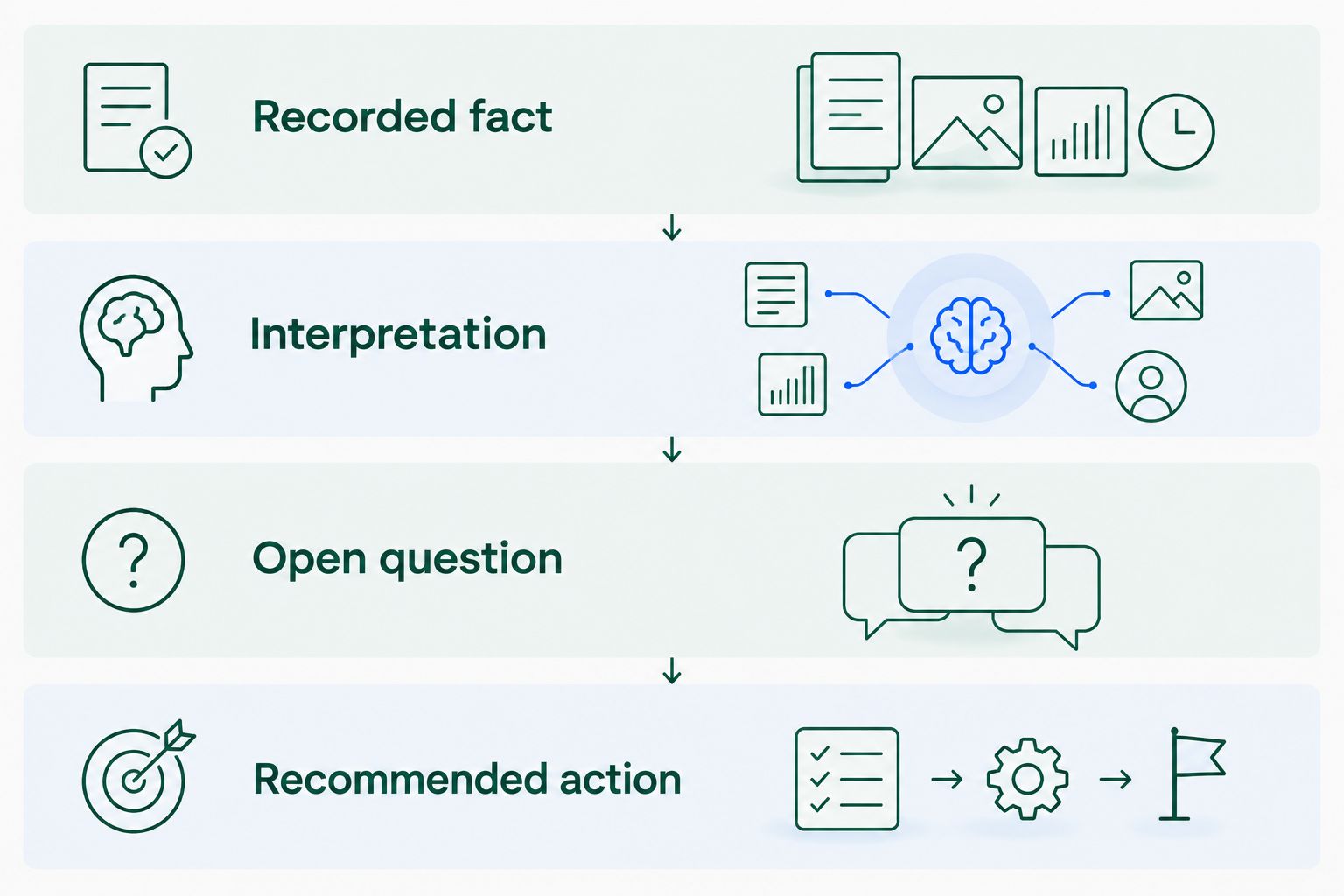
Ask the report to distinguish these categories explicitly:
- Recorded fact: Directly supported by a document, record, or calculation.
- Interpretation: An explanation drawn from those facts.
- Open question: Something the available evidence does not resolve.
- Recommended action: A proposed next step requiring human judgment.
This separation makes the report useful without making every sentence sound equally certain. You can accept an observation while rejecting its explanation, or approve an investigation without accepting the proposed cause.
When sources conflict, preserve the disagreement. Show which records differ and ask the responsible owner to resolve the conflict rather than allowing the report to blend incompatible accounts into a single story.
Why source quality varies
Review the evidence conditions, not just the writing. These factors determine what a report can support:
- Source scope: A team-level record does not establish a company-wide result.
- Version status: A draft and an approved policy serve different purposes.
- Reporting boundaries: Different cutoffs produce different sets of included events.
- Metric definitions: Identical labels can hide different inclusion rules.
- Evidence distance: Each summary between a claim and its original source adds another interpretation to inspect.
- Reviewer access: Evidence that an approver cannot inspect leaves a verification gap.
Better wording cannot repair these problems. Resolve the source issue, narrow the claim, or leave the conclusion open.
Test the report on real team work
Use the following as illustrative evaluation tasks, not measured customer results. Choose work your team understands well enough to challenge. Keep the original evidence available throughout the review.
Sales: explain an account change
Task: Explain why an account's forecast changed. Supply the relevant account records, dated customer communications, and the team's forecast definitions.
Expected output: A dated sequence of changes with evidence attached to each explanation. Assess whether the report distinguishes a recorded forecast edit from a confirmed customer commitment and identifies any unresolved disagreement.
Finance: explain a variance
Task: Draft a variance explanation using the approved budget, relevant transaction records, and your accounting definitions.
Expected output: A reproducible calculation followed by an explanation tied to evidence. Assess the arithmetic separately from the narrative; a correct difference does not prove that the stated cause is correct.
Operations: prepare a handoff report
Task: Summarize unresolved work using status records, ownership information, and documented dependencies.
Expected output: Open items, supporting evidence, and questions requiring an owner. Assess whether completed work remains incorrectly listed as open and whether discussion notes have been mistaken for approved instructions.
Everyday work: prepare a briefing
Task: Prepare a meeting briefing or research summary from the relevant documents and recent decisions. For brand and design work, include the approved brief and feedback history.
Expected output: A concise summary that separates approved direction from suggestions. Assess whether a reader can trace each consequential statement without rereading every source from scratch.
Evaluate shared context without skipping verification
Computer connects a company's accounts, teams, and systems through native Shared Memory. In practical buying terms, evaluate whether shared company context helps your team produce answers that remain understandable and checkable across departmental boundaries.
Computer is best suited to teams evaluating an AI teammate built around shared company context. That positioning extends beyond sales to finance, operations, and everyday work. It does not remove the need to inspect sources, calculations, and conclusions.
Use the confirmed 30-day free trial of Computer Pro to evaluate a recurring reporting task. Include a follow-up after the underlying information changes, then check whether the new output reflects the intended reporting boundary. Treat this as an evaluation plan, not a promised product result.
Evaluate reports against your company context
Use the 30-day free trial to assess source traceability on a recurring team report.
What should you ask before approving a report?
Ask which claims are directly supported, which are calculated, and which are interpretations. Then ask the report owner to demonstrate the evidence behind the conclusion that drives the decision.
Use a simple approval rule: approve supported claims, qualify interpretations, and hold unresolved decision-driving claims. Do not let an attractive summary substitute for an accountable owner.
Can a report with citations still be wrong?
A report with citations can still be wrong. Its sources might be real while its conclusion misstates their scope, drops a qualification, or applies an incorrect calculation.
Check the relationship between claim and evidence. Counting references does not answer that question.
Should every sentence have a source?
Every consequential factual claim needs identifiable support. That does not require attaching a separate reference to every transition or clearly labeled recommendation.
Prioritize claims about money, commitments, performance, policy, and recommended decisions. Keep the evidence close enough that readers know which claim it supports.
FAQ
How do I check whether an AI report generator invented a source?
Open the reference and confirm that the original material exists and contains the claimed evidence. A plausible title or a working link does not establish that the source supports the report.
What's the difference between a citation and a verified claim?
A citation identifies a reference; a verified claim has been checked against evidence that supports its exact meaning. Verification also includes dates, scope, and calculations when they affect the conclusion.
Can I trust a report that uses internal company documents?
Internal company documents still require source checks. Confirm their version, approval status, reporting period, and relevance before treating their contents as authoritative.
How do I verify numbers in an AI-generated finance report?
Recalculate decision-driving numbers from the underlying records using the stated metric definition and filters. Check the explanation separately because correct arithmetic does not establish the cause of a change.
What should I do when two report sources disagree?
Keep the disagreement visible and ask the responsible source owner to resolve it. Do not approve a single conclusion that silently combines incompatible records.
How should I evaluate an AI report generator in 2026?
Evaluate an AI report generator on a real reporting task with evidence your team can independently check. Test source matching, reporting boundaries, calculations, and the distinction between facts and interpretations.
Does shared company memory replace source verification?
Shared company memory does not replace source verification. Reviewers still need to establish that each important conclusion follows from the relevant evidence.
One last thing
Save the evidence boundary with the approved report: the covered period, source versions, extraction conditions, and unresolved questions. For your 2026 reporting process, make that record part of approval rather than an afterthought.
The strongest report is not the one that sounds most certain. It is the one whose important claims your team can check.