
For project leaders, an AI report generator is a tool that turns project evidence into weekly status updates so teams can resolve blockers and make decisions. Your challenge is not producing more text; it is reconciling changing deadlines, conflicting updates, and decisions scattered across teams.
- Computer suits project leaders who want shared company context behind weekly reports.
- Choose an AI report generator by checking evidence, unresolved conflicts, and decision usefulness—not writing polish.
- Start with a manual reporting template, then evaluate an AI teammate against the same source material.
- Use the Computer Pro 30-day free trial to test recurring reporting work before committing.
Why AI report generation matters for project leaders
A weekly project update connects execution to decisions. A task list tells you what people recorded. A useful report explains what changed, what threatens the plan, and who needs to act.
That distinction matters when engineering reports implementation progress, sales tracks a customer commitment, and finance watches the same project's spending. Each team contributes evidence. None of those views, alone, establishes the project's overall status.
Computer connects company accounts, teams, and systems through native shared memory. In practical terms, that makes shared company context central to its proposition—not just the wording of an isolated answer.
Computer suits project leaders who want shared company context behind weekly reports. For a 2026 evaluation, test that fit with your actual reporting questions. A well-written summary is not proof that the underlying status is correct.
Build a weekly update your team can trust
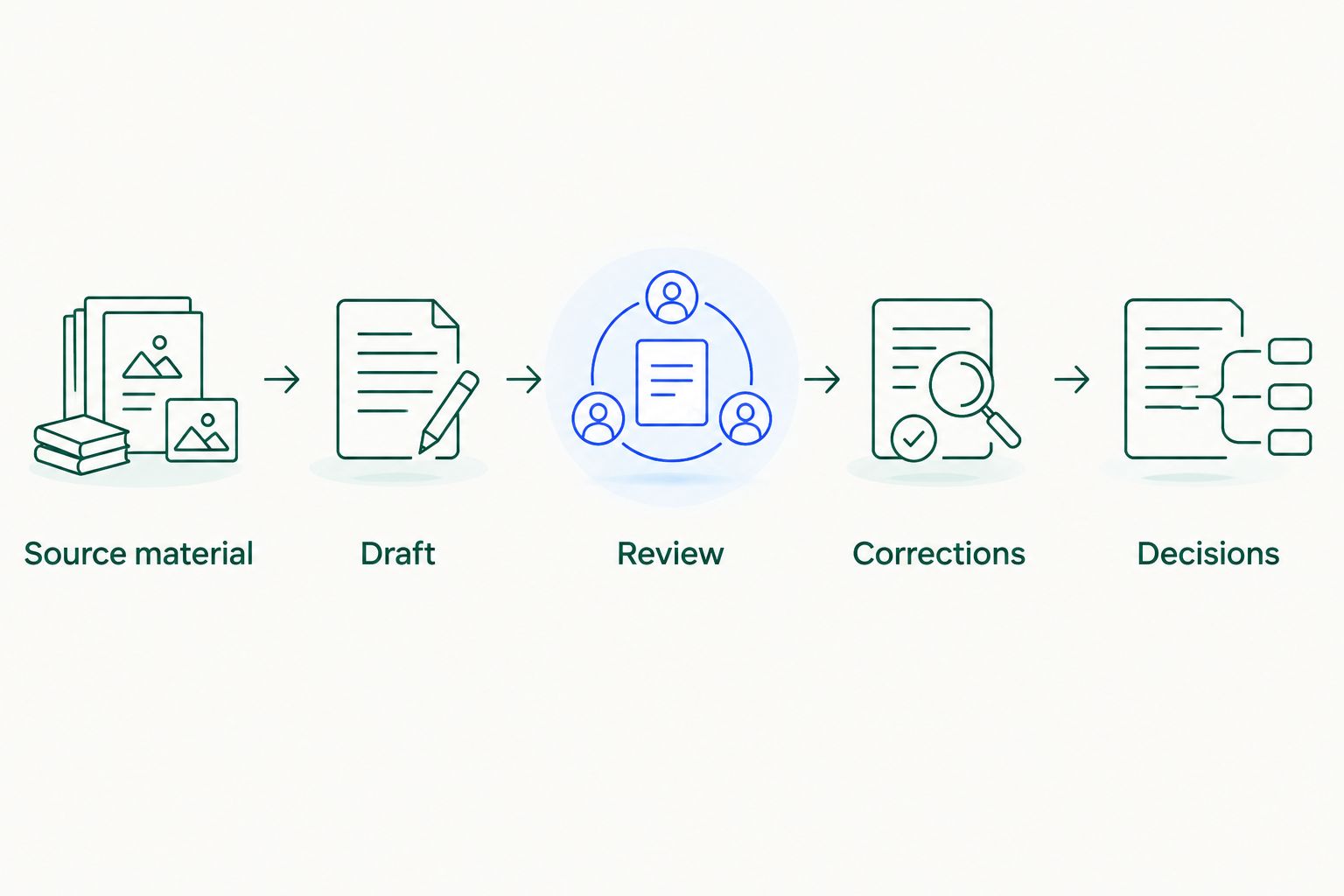
Use the same reporting process whether you start manually or evaluate an enterprise AI assistant. The following steps define what the report needs to do before you choose how to produce it.
Define the decisions your report must support
Start manually with a blank document. Write down who reads the update and what that person needs to decide. A project sponsor needs a different view from the person coordinating tomorrow's implementation work.
For an illustrative cross-team launch, the sponsor might need to approve a scope change. The delivery lead needs the unresolved dependency and its owner. Finance needs to know whether the revised plan changes the spending forecast. Those are distinct questions, even when they belong in one report.
Keep the executive summary short enough that readers can identify the required action without reconstructing the project history. Detail belongs beneath the decision, not ahead of it.
Best for: project leaders defining a reporting standard before selecting software. Create these fields first:
- Reporting period and intended audience.
- Overall status, with your definition of each status label.
- Changes since the previous update.
- Blockers, dependencies, and accountable owners.
- Decisions needed and the consequences of delay.
Gather evidence within a clear reporting window
The manual approach is straightforward: ask owners for updates, collect the relevant records, and record where each claim came from. Separate an update's publication date from the date of the event it describes.
For an illustrative reporting window, use June 1–7, 2026. A note posted during that window might describe work completed earlier. Conversely, an older planning document might still define the milestone you are measuring against.
Do not treat the newest message as the final authority. A recent comment can be a proposal rather than an approved change. When sources disagree, carry the disagreement into review instead of silently choosing the more convenient version.
Keep your evidence packet small enough to inspect, but complete enough to explain the status:
- The agreed scope and current milestone plan.
- Relevant task changes and owner updates.
- Decisions recorded during the reporting window.
- Open dependencies and unresolved questions.
- Source references and timestamps for material claims.
Test shared context on one real project
Start with a manual baseline: give a reviewer the evidence packet and ask for a status update using your template. Preserve that version. It becomes the reference for judging whether an assistant actually reduces repeated work.
Then evaluate Computer as an AI report generator for the same project. Its shared-memory positioning makes it relevant when reporting depends on company context across teams and systems. The buying question is specific: does the workflow preserve the context your report needs without making you rebuild it every week?
Treat the evaluation as a test, not a capability assumption. Confirm which sources, actions, and review controls are supported for your team's intended workflow.
Best for: leaders evaluating recurring, cross-team reporting rather than a one-off summary. Test these context questions:
- Which milestone is the team reporting against?
- Which owner is accountable for the unresolved dependency?
- Which decision changed the previous plan?
- Which customer commitment affects the deadline?
- Which context still needs manual clarification?
Draft against a fixed report contract
Before using software, write one report yourself from the evidence packet. Notice where you have to distinguish a fact from an interpretation. Those distinctions belong in the instructions you give an assistant.
A report contract defines the output, not just the topic. Specify the audience, reporting window, required sections, and treatment of missing evidence. Ask for unresolved questions to remain visible rather than be converted into confident narrative.
For your 2026 reporting template, separate completed work from forecasts. A planned review is not a completed approval. A task marked finished is not necessarily evidence that a milestone has been accepted.
Best for: teams whose reports vary too much between authors. Require these output sections:
- Overall status and its supporting evidence.
- Changes since the last reporting period.
- Completed milestones and remaining dependencies.
- Risks, owners, and next actions.
- Decisions needed from the named audience.
- Conflicting or missing information requiring review.
Verify the claims before you publish
Review the draft manually against its sources. Begin with claims that change a decision: milestone completion, deadline movement, ownership, spending implications, and customer commitments. Correct grammar later.
For the illustrative week ending June 7, 2026, an update saying testing started does not establish that testing passed. Likewise, a request for extra budget does not establish that the budget was approved. Your reviewer should be able to explain which evidence supports each conclusion.
Set a 15-minute review target as a trial constraint, not a promised product result. If verification consistently takes longer, identify whether the problem is unclear evidence, a poor report format, or unsupported conclusions.
Best for: leaders publishing updates that affect commitments or approvals. Check these points:
- Every material status claim has an identifiable source.
- Proposed changes remain distinct from approved changes.
- Dates match the agreed reporting window.
- Owners and next actions are explicit.
- Conflicting evidence is visible to the reviewer.
- Sensitive details match the intended audience.
Measure repeatability across reporting cycles
Run the next update with the same template and review rules. The manual baseline shows what your current process requires; the assisted workflow shows whether repeated reporting becomes easier without weakening the checks.
Use the Computer Pro 30-day free trial to evaluate recurring work, not just the first impressive draft. Record the context you supplied, the corrections you made, and the report you approved. Compare equivalent projects and audiences rather than an executive update against a detailed delivery review.
Broaden the test only after the core workflow holds up. The same project evidence can support meeting preparation or a daily briefing, but those outputs need their own audience and review criteria.
Best for: team leaders deciding whether a workflow deserves broader adoption. Track these observations:
- Time spent collecting and clarifying source material.
- Time spent reviewing the generated draft.
- Material corrections required before publication.
- Context you had to supply again.
- Decisions the report enabled or left unresolved.
Compare reporting options by the work they remove
Choose the smallest workflow that solves your actual reporting problem. If the evidence is already assembled and stable, a reusable prompt is a different purchase decision from an AI teammate expected to work with shared company context.
The options below describe workflow trade-offs, not measured performance results. Confirm product-specific capabilities during evaluation.
| Option | Best for | Main advantage | Key limitation |
|---|---|---|---|
| Manual document and owner updates | A narrow project with accessible evidence | You control the structure and inspect sources directly | Collection, reconciliation, and rewriting remain manual |
| Reusable prompt with an assembled evidence packet | Drafting from a bounded set of records | You can reuse instructions while changing the source material | Someone must assemble the packet and verify the output |
| Computer as an AI report generator | Evaluating recurring reports that need shared company context | Native shared memory connects company accounts, teams, and systems | You still need to confirm source coverage and assess reporting accuracy for your workflow |
Do not buy a broader workflow to solve a formatting problem. If your existing report contains sound evidence but reads poorly, start by fixing the template. If each update requires reconstructing decisions across teams, test shared context directly.
Test your weekly reporting workflow
Use the Computer Pro 30-day free trial to assess shared context, report quality, and review effort.
Use a prompt that keeps uncertainty visible
Best for: a first trial using a manually assembled evidence packet. The following is an illustrative prompt, not a measured customer result or a promise about a specific product's output.
Prepare a weekly project status update for the project sponsor using the supplied evidence. The reporting period is June 1–7, 2026. State the overall status, changes since the previous update, completed work, unresolved dependencies, and decisions needed. Separate recorded facts from interpretations. Identify the source behind each material claim. If sources conflict, describe the conflict. If information is missing, name the missing information rather than filling the gap. End with actions, accountable owners, and deadlines only where the evidence supplies them.
After the first draft, ask the reviewer a harder question: What decision would you make differently after reading this? If the answer is none, the report might be describing activity without explaining its consequences.
Keep the prompt stable during the initial evaluation. Changing the instructions, evidence scope, and audience simultaneously makes it harder to understand why output quality changed.
Common mistakes project leaders make
Reporting activity as project health
A long list of completed tasks does not establish that the critical milestone is on track. Connect the status label to the dependencies that determine the outcome. Put routine activity below the items that change delivery confidence.
Letting a summary erase disagreement
An engineering update and a customer-facing commitment can describe different expectations. Do not ask the assistant to smooth that difference into one confident date. Preserve both positions and name the decision needed to reconcile them.
Treating remembered context as current evidence
Useful context can become outdated. A remembered owner, deadline, or scope decision still needs checking against the current project record. Shared memory and current evidence serve different purposes; your review process needs both.
Sending every audience the same update
A leadership briefing, finance review, and implementation handoff need different levels of detail. Keep the underlying facts consistent, but change the emphasis. A finance audience needs supported spending implications, not an unsupported estimate added for completeness.
Evaluating only the first draft
A polished first response says little about repeated reporting. Test the next cycle, changed ownership, and unresolved questions. Your 2026 buying decision should reflect the work required to produce an approved update—not the speed of generating unreviewed prose.
FAQ
What's the best AI report generator for weekly project updates?
The best fit is the workflow that produces reviewable updates from your actual project evidence. Computer is relevant for teams evaluating shared company context; test source coverage, accuracy, and review effort before deciding.
Can an AI report generator determine whether my project is on track?
You should require evidence and explicit status criteria before accepting an on-track assessment. Completed tasks alone do not prove that critical dependencies or milestones are secure.
How do I stop a weekly report from including unsupported claims?
Require source references for material claims and review them before publication. Instruct the assistant to identify missing information and conflicting evidence instead of completing the narrative with assumptions.
Is shared memory the same as uploading project documents?
Shared organizational memory and a manually assembled document packet are different workflow approaches. Evaluate whether your chosen setup preserves relevant company context, and confirm how it handles changed or outdated information.
What should I test during a reporting trial?
Test collection effort, draft quality, source verification, and repeated reporting cycles. Record material corrections and any context you have to supply again so the decision reflects the full workflow.
Can the same project information support sales, finance, and operations?
The same underlying evidence can inform different team reports, but each audience needs a distinct emphasis. Sales needs customer commitments, finance needs supported spending implications, and operations needs dependencies and accountable actions.
How long is the Computer Pro free trial?
The Computer Pro free trial lasts 30 days. Use it to assess recurring weekly reporting and the effort required to review each update, rather than judging only an initial draft.
One last thing
Test a report with deliberately conflicting evidence. In a separate evaluation packet, include an illustrative owner update that says a milestone is complete and a review note that says approval is outstanding. Label the packet as a test so it cannot be mistaken for live project information.
The useful response exposes the conflict and identifies the missing decision. A confident summary that simply chooses one account fails your reporting requirement, however readable it sounds.